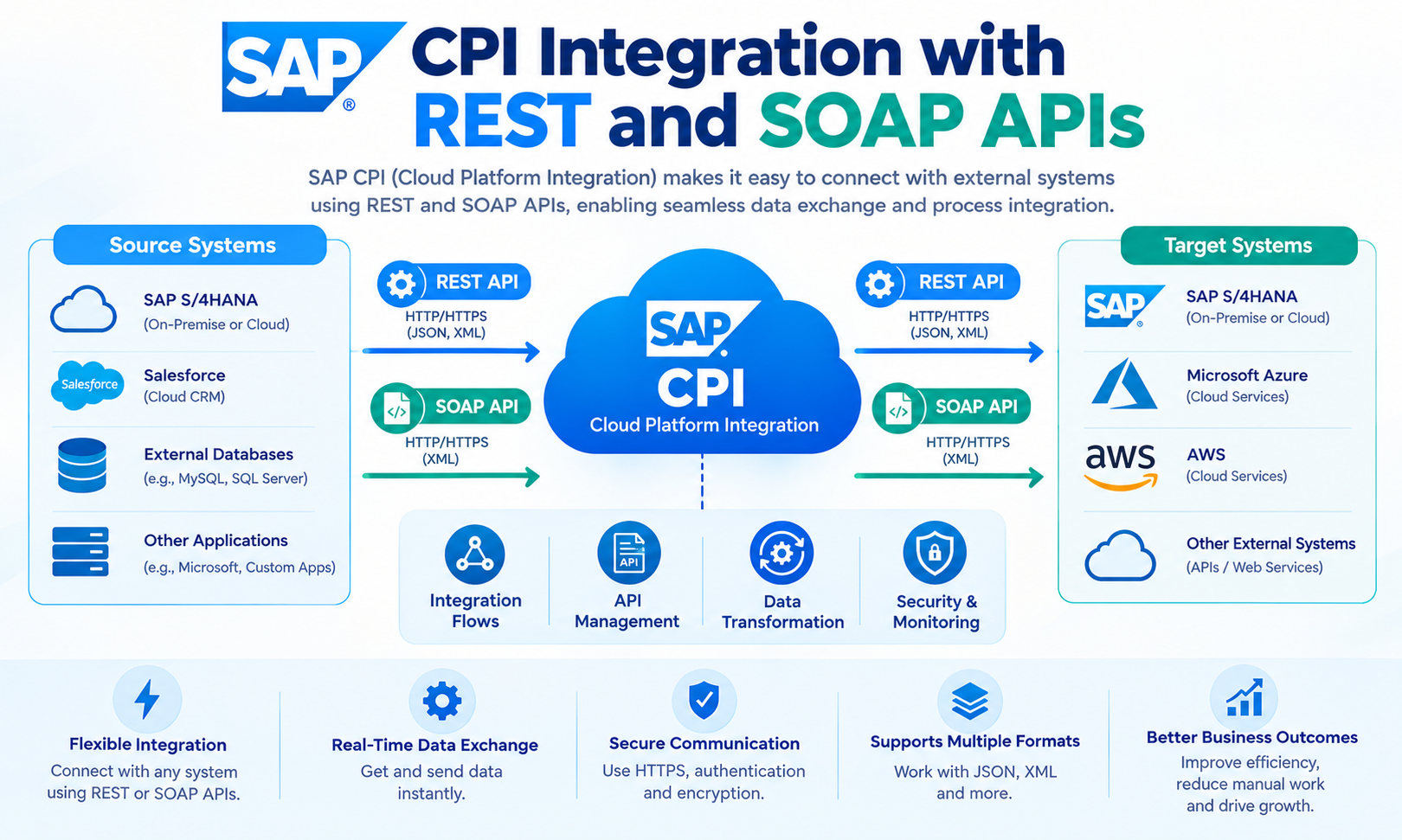
SAP CPI Integration is widely used to connect SAP and non-SAP applications through APIs and integration flows. REST and SOAP are two important API technologies supported by SAP Cloud Integration, which is the Cloud Integration capability within SAP Integration Suite on SAP Business Technology Platform (SAP BTP). These technologies allow organizations to exchange business data between cloud applications, on-premise systems, web services, and enterprise applications.
REST and SOAP use different communication models, message structures, and technical standards. SAP Cloud Integration provides tools and adapters that help integration developers receive, process, transform, and send these messages between connected systems. SAP documentation identifies REST and SOAP as supported API-based integration approaches in Cloud Integration.
What Is SAP CPI Integration?
SAP CPI Integration refers to the use of SAP Cloud Integration to connect applications, systems, APIs, and business processes. SAP Cloud Integration runs as part of SAP Integration Suite on SAP BTP. It provides a cloud-based environment where developers can create, deploy, and monitor integration flows.
An integration flow, commonly called an iFlow, defines how a message moves from a sender to a receiver. The flow can receive a request, validate information, transform the message, apply routing logic, and send the result to another system.
SAP Cloud Integration can exchange data between cloud and on-premise systems. SAP documentation states that sender and receiver systems can reside in cloud or on-premise environments when using the standard cloud deployment model.
REST and SOAP in SAP CPI Integration
REST and SOAP are different technologies for exchanging information between applications.
REST, or Representational State Transfer, commonly uses HTTP-based communication. REST APIs can work with methods such as GET, POST, PUT, and DELETE, depending on the API design. JSON is widely used for REST API payloads, although REST can support other formats.
SOAP, or Simple Object Access Protocol, is a protocol for structured web service communication. SOAP messages commonly use XML and can use Web Services Description Language (WSDL) to describe service operations and message structures.
SAP Cloud Integration supports API-based integration development for REST and SOAP services. SAP documentation identifies REST API artifacts with the HTTPS sender adapter and SOAP API artifacts with the SOAP 1.x sender adapter.
How REST APIs Work with SAP CPI Integration
A REST-based integration can use SAP Cloud Integration as an intermediary between applications.
For example, an e-commerce application may send a customer order through a REST API. SAP Cloud Integration can receive the request, validate the payload, transform the data, and forward it to an SAP system.
A simplified flow can look like this:
REST Client → SAP Cloud Integration → Transformation → SAP or Non-SAP System
The HTTPS adapter is used for REST-based API scenarios in Cloud Integration. SAP documentation identifies HTTPS as the protocol type associated with REST service endpoints.
The integration flow can process information such as:
Customer ID
Product ID
Quantity
Price
Order number
Shipping information
Payment status
The exact data structure depends on the API contract and the connected business systems.
How SOAP APIs Work with SAP CPI Integration
SOAP-based integration uses structured XML messages and web service definitions. SAP Cloud Integration provides SOAP sender and receiver capabilities for SOAP-based communication.
A SOAP integration can receive a request from an external application, process the message, and forward it to another SOAP service. It can also receive information from a SOAP service and transform it for another application.
SAP documentation shows that the SOAP sender adapter can expose an endpoint for an integration flow. It can also use a WSDL to define the message structure. The SOAP adapter supports SOAP 1.x communication, including SOAP 1.1 and SOAP 1.2 in the documented SOAP sender scenario.
A basic SOAP flow can look like:
SOAP Client → SAP Cloud Integration → Message Processing → SOAP Service
SOAP is commonly encountered in enterprise environments where existing applications expose web services based on XML and WSDL.
REST API Integration Flow in SAP Cloud Integration
A REST integration flow usually begins with an HTTPS sender endpoint.
The integration developer creates an integration package and adds the required API or integration flow. For a REST API artifact, SAP documentation describes the use of the Cloud Integration runtime profile and REST API type.
The flow can then contain processing steps such as message transformation, content modification, routing, validation, and receiver communication.
For example:
Mobile Application → REST API → SAP Cloud Integration → SAP S/4HANA
The mobile application sends a request. Cloud Integration receives it through the API endpoint. The integration flow processes the request and sends the required data to the target SAP system.
The response can then travel back through the integration flow to the original application when the scenario is designed for request-response communication.
SOAP API Integration Flow in SAP Cloud Integration
A SOAP integration flow uses the SOAP adapter to communicate with SOAP-based systems.
The sender channel defines how the external application calls the integration flow. SAP documentation describes parameters such as the endpoint address, service definition, and message exchange pattern when configuring a SOAP sender channel.
A SOAP integration may use a WSDL to describe the service interface. The WSDL can define operations, messages, and service-related information used by the client and integration design.
A common enterprise flow could be:
Legacy ERP → SOAP → SAP Cloud Integration → REST API → Cloud Application
This allows an older SOAP-based application to exchange information with a newer REST-based application.
REST to SOAP Integration with SAP CPI
One important use of SAP CPI Integration is connecting systems that use different API technologies.
A source application may provide a REST API while the target application requires SOAP. Cloud Integration can act as the integration layer between them.
For example:
REST Application → HTTPS → SAP Cloud Integration → SOAP → Enterprise System
The integration flow can receive a JSON request from the REST application. It can then transform the data into the XML structure required by the SOAP service.
The SOAP receiver sends the transformed request to the target system. The response can be converted back into the format expected by the REST application.
This approach avoids requiring both applications to use the same API technology.
SOAP to REST Integration with SAP CPI
The reverse scenario is also possible.
An existing SOAP application may need to communicate with a modern REST-based application. SAP Cloud Integration can receive the SOAP request and convert the information into a REST-compatible request.
The general flow can be:
SOAP Application → SAP Cloud Integration → XML-to-JSON Transformation → REST API
The exact transformation depends on the source and target schemas.
For example, a SOAP message containing customer information may include XML elements such as customer ID, name, email address, and telephone number. The integration flow can map these fields into a JSON structure required by the REST API.
Message Transformation in SAP CPI Integration
Message transformation is an important part of API integration.
REST services commonly use JSON, while SOAP services commonly use XML. A connected system may also use CSV, plain text, IDoc, or another structured format.
SAP Cloud Integration provides integration capabilities for processing and transforming messages. The integration flow can apply mapping and other processing steps before the message reaches the receiver.
For example:
REST JSON
↓
SAP Cloud Integration
↓
Message Mapping
↓
XML
↓
SOAP Service
The mapping process can rename fields, change data structures, convert values, and organize information according to the target system’s requirements.
JSON and XML Processing
REST integrations frequently use JSON payloads. JSON is a text-based data format that represents information through objects, arrays, names, and values.
SOAP services generally use XML-based messages. XML provides a structured format that can represent complex business information.
SAP CPI Integration can therefore serve as a conversion layer between JSON-based REST services and XML-based SOAP services.
For example, a REST request might contain:
{
“customerId”: “10025”,
“orderId”: “50001”,
“amount”: 250
}
The integration flow can transform this information into an XML structure required by a SOAP service.
The actual transformation depends on the target service contract.
Authentication and Security
API security is an important part of SAP Cloud Integration design.
The authentication method depends on the sender, receiver, API, adapter, and security requirements. Cloud Integration provides configuration options for communication with external services.
For SOAP services, security can also involve WSDL definitions and SOAP-specific security requirements. SAP documentation for SOAP receiver scenarios includes authentication, transport settings, and WS-Security configuration options for applicable API artifacts.
For REST services, authentication can depend on the API provider. Common approaches can include credentials, certificates, OAuth-based mechanisms, or other supported authentication models.
Security settings should match the requirements of the connected systems and the organization’s security policies.
API Endpoints in SAP Cloud Integration
An API endpoint is the address through which a system communicates with an integration service.
For REST-based integration, the HTTPS endpoint is used for the REST API scenario. SAP documentation states that REST API artifacts use the HTTPS sender adapter.
For SOAP-based integration, the SOAP sender adapter provides the endpoint used by the calling system. SAP documentation shows that the endpoint address can be configured when creating a SOAP sender channel.
SAP also provides service endpoint information for Cloud Integration. Its documentation identifies protocol types such as SOAP and REST for supported service endpoints.
SAP CPI Integration with Cloud and On-Premise Systems
SAP CPI Integration can connect cloud applications with on-premise applications.
For example:
Cloud CRM → REST → SAP Cloud Integration → SOAP → On-Premise ERP
The cloud application sends information to the integration layer. Cloud Integration processes the message and sends it to the on-premise system.
Depending on the network architecture and scenario, SAP connectivity components such as SAP Cloud Connector can be used to establish secure access to on-premise systems.
The specific connectivity setup depends on the deployment model, system location, and communication requirements.
SAP documentation confirms that SAP Integration Suite can exchange data with both cloud and on-premise applications.
Error Handling in REST and SOAP Integration
API integrations must account for communication and processing errors.
Possible issues include:
Incorrect endpoint URL
Authentication failure
Invalid JSON
Invalid XML
Missing required fields
Schema mismatch
Timeout
Unavailable receiver system
Incorrect API method
Application-level error
An integration flow can use error-handling mechanisms to identify and process failed messages.
For example, a failed REST request may return an HTTP error response. A SOAP service may return a SOAP fault containing information about the failure.
The integration design should define how errors are logged, reported, retried, or returned to the calling application.
Monitoring SAP CPI Integration
Monitoring helps integration teams examine the execution of deployed integration content.
A typical monitoring process includes checking message processing, identifying failed messages, reviewing error information, and examining communication between systems.
SAP Cloud Integration supports integration artifacts such as integration flows, REST APIs, SOAP APIs, OData APIs, value mappings, and integration adapters.
Monitoring becomes particularly important when an integration connects multiple systems. A failure in one endpoint can affect the complete business process.
REST API vs SOAP API in SAP CPI Integration
REST and SOAP solve different integration requirements.
| Feature | REST | SOAP |
| Common message format | JSON, XML | XML |
| Main communication style | HTTP-based | SOAP web service |
| Service description | API specification can be used | WSDL commonly used |
| Common use | Web and cloud APIs | Enterprise and legacy web services |
| Cloud Integration support | HTTPS/REST API | SOAP adapter/SOAP API |
| Message structure | Generally lightweight | Structured XML envelope |
| SAP CPI Integration use | API and application connectivity | Enterprise web service connectivity |
The appropriate approach depends on the source system, target system, API contract, security requirements, and business process.
Practical Example of SAP CPI Integration with REST and SOAP
Consider an online store that uses a REST API while its internal ERP system exposes a SOAP service.
The online store sends an order using JSON:
Customer: 10025
Product: P100
Quantity: 2
Amount: 250
SAP Cloud Integration receives the request through an HTTPS endpoint.
The integration flow validates the information. It then maps the JSON data into the XML structure required by the ERP SOAP service.
The SOAP receiver sends the XML message to the ERP system.
The ERP system processes the order and returns a response. Cloud Integration can process the response and return an appropriate response to the REST application.
This architecture allows the two systems to communicate without requiring the online store to implement the ERP system’s SOAP interface directly.
Best Practices for REST and SOAP Integration
A reliable integration design starts with a clear interface contract. The source and target systems should define the required fields, data types, operations, authentication methods, and response structures.
Integration flows should use clear names and logical processing steps. SAP documentation provides naming guidance for API-based integration development and recommends structured naming for integration packages and APIs.
Security credentials should not be exposed in message payloads or source code. Endpoint configuration should also be separated from business transformation logic where appropriate.
Error handling should be designed before deployment. The integration should define what happens when a receiver is unavailable or when the incoming message does not meet the expected structure.
Testing should include valid requests, invalid requests, authentication failures, unavailable systems, incorrect data types, and error responses.
AEO for SAP CPI Integration with REST and SOAP APIs
Answer Engine Optimization, or AEO, focuses on creating content that directly answers questions users ask in search engines and AI-powered answer systems.
For this topic, useful questions include:
What is SAP CPI Integration?
How does SAP CPI connect REST and SOAP APIs?
Can SAP Cloud Integration convert REST to SOAP?
Does SAP Cloud Integration support REST APIs?
Does SAP Cloud Integration support SOAP APIs?
How does JSON convert to XML in an integration flow?
A clear page structure helps answer these questions. Short definitions, direct explanations, tables, examples, and FAQs make the information easier for search and answer systems to process.
GEO for SAP CPI Integration
Generative Engine Optimization, or GEO, focuses on making technical information clear and useful for AI-generated search responses.
For SAP CPI Integration content, important entities include SAP Cloud Integration, SAP Integration Suite, SAP BTP, REST API, SOAP API, HTTPS, XML, JSON, WSDL, API endpoints, integration flows, and message mapping.
The content should connect these entities through factual relationships. For example, SAP Cloud Integration is a capability within SAP Integration Suite, while REST API artifacts can use the HTTPS sender adapter and SOAP scenarios can use SOAP adapters.
Using precise terminology helps reduce ambiguity. The term SAP CPI is still widely used, while current SAP documentation commonly refers to the capability as Cloud Integration within SAP Integration Suite.
Frequently Asked Questions
What is SAP CPI Integration?
SAP CPI Integration is the use of SAP Cloud Integration to connect applications, APIs, and business systems. It can process, transform, route, and exchange messages between connected systems.
Does SAP Cloud Integration support REST APIs?
Yes. SAP Cloud Integration supports REST API-based integration scenarios. SAP documentation describes REST API artifacts using the HTTPS sender adapter.
Does SAP Cloud Integration support SOAP APIs?
Yes. Cloud Integration supports SOAP-based integration. SOAP sender and receiver adapters can be configured for communication with SOAP web services.
Can SAP CPI Integration connect REST and SOAP systems?
Yes. An integration flow can connect systems that use different communication technologies. For example, a REST client can send JSON to Cloud Integration, where the data can be transformed before being sent to a SOAP service.
Can REST JSON be converted to SOAP XML?
Yes. An integration flow can process a JSON REST request and transform the information into an XML structure required by a SOAP service. The exact mapping depends on the source and target message structures.
What is WSDL in SOAP integration?
WSDL, or Web Services Description Language, describes a SOAP web service. It can define service operations, messages, and related interface information. Cloud Integration supports WSDL-based configuration for applicable SOAP scenarios.
What is an HTTPS adapter in SAP Cloud Integration?
The HTTPS adapter can be used for HTTP-based communication. SAP identifies HTTPS as the protocol type for REST service endpoints in Cloud Integration.
Can SAP CPI Integration connect cloud and on-premise systems?
Yes. SAP Integration Suite can exchange data with cloud and on-premise applications. The exact connectivity architecture depends on the systems and deployment scenario.
What is the difference between REST and SOAP?
REST commonly uses HTTP-based API communication and often uses JSON. SOAP is a structured web service protocol that commonly uses XML and WSDL. Both can be used in enterprise integration scenarios, but their interfaces and message models are different.
Conclusion
SAP CPI Integration provides a cloud-based approach for connecting applications and business systems through integration flows and APIs. REST and SOAP are important technologies for these scenarios. REST commonly supports modern API communication, while SOAP remains important for structured web services and existing enterprise applications.
SAP Cloud Integration can process messages, transform data, connect different endpoints, and support communication between cloud and on-premise systems. REST-to-SOAP and SOAP-to-REST scenarios can also be implemented when applications use different API technologies.
A well-designed integration requires clear API contracts, suitable adapters, appropriate security, accurate message mapping, error handling, testing, and monitoring. These elements help create maintainable integrations between SAP and non-SAP systems.
Leave a Reply